Orders Preferences
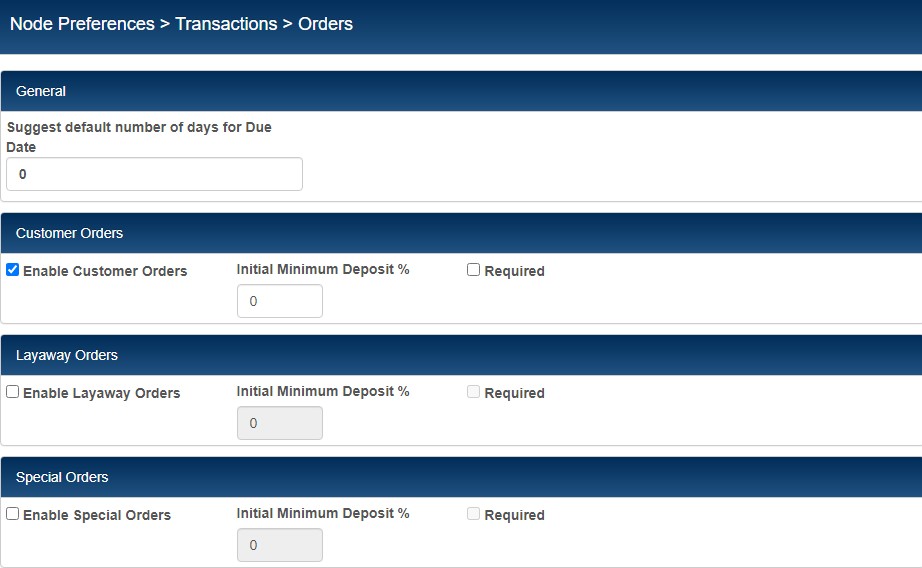
In the Transactions - Orders area, you can enable the use of customer orders and/or layaway orders and define a minimum percentage for each order type. The minimum order percentage entered here for each order type will be entered by default when a user tenders a transaction for that type of order.
You must enable each order type to be able to create that type of order in RP Prism. By default, customer orders are enabled; layaways are not. If you enter a minimum deposit percentage, you have the option of requiring the minimum percentage. If the option to require a minimum percentage is not selected, then the minimum deposit percentage is entered by default, but the user can continue without taking a deposit.
| Preference | Description |
|---|---|
| Suggest default number of days for Due Date |
This release includes a new preference for setting a due date for orders. The preference allows you to enter the maximum number of days that can elapse before an order should be filled. For example, if you enter "20" and create an order on the first of the month, then the order must be fulfilled by the 20th. Previously, there was no way to set the due date for orders. |
| Enable Customer Orders | If selected, users can create new customer orders. |
| Enable Layaway Orders |
If selected, users can create new layaway orders. If both Customer Order and Layaway Order are selected, users are given the option of choosing the order type when creating a new order. |
Orders Preferences